Turn any Google Chat message into the next step
Hana finds the relevant chat history, docs, and workspace context so your team can summarize threads, assign owners, set follow-ups, answer questions with evidence, and remember what was decided.
First question to ask
“@Hana summarize this thread and tell me the next step.”
Then follow with: “@Hana what did we decide about this, and who owns it?”
No credit card required • Quick setup • Works inside Google Chat
Rated 4.72/5 from 18 reviews on Google Workspace Marketplace.

Where Hana works
Google Chat is for using Hana. The dashboard is for setting Hana up.
That distinction matters. Hana should feel native in the conversation, while the dashboard stays focused on admin setup, source controls, and rollout management.
Google Chat
This is the working surface
Most users should experience Hana inside Google Chat. This is where people mention Hana, retrieve decisions, summarize threads, create follow-ups, and keep work moving.
- Mention @Hana inside the live thread
- Get grounded answers without leaving the conversation
- Turn the thread into a reminder, task, poll, summary, or reply
Hana Dashboard
This is the setup and control surface
The dashboard is for connecting sources, managing rollout, reviewing usage, and controlling how Hana supports the workspace. It is not the main place regular users should live.
- Connect spaces, docs, files, and approved sources
- Manage source sync, permissions, and cleanup
- Review plan, usage, and operational settings
Simple rule: teammates mostly stay in Google Chat. Workspace owners and admins use the dashboard to connect context, manage rollout, and monitor usage.
Day 1 with Hana
The first useful loop should take minutes, not a training session.
The clearest way to evaluate Hana is simple: start from one real message, recover the missing context, and turn that answer into visible follow-through inside Google Chat.
Step 1
Install Hana in Google Chat
Start where the request already happens instead of sending users into a setup-heavy dashboard first.
Step 2
Connect one active space or source
Give Hana one real place to learn from so the first answer can be grounded in actual team context.
Step 3
Mention Hana with one real team question
Start with: “@Hana summarize this thread and tell me the next step.” Then ask: “@Hana what did we decide about this, and who owns it?”
Step 4
Ask for the follow-through
Tell Hana the output you need next: summary, owner, reminder, poll, task, or reply with evidence.
Step 5
Get a reminder or digest touchpoint
Hana comes back into the workflow with visible outputs so the value does not disappear after one session.
What success looks like
By the end of Day 1, a new workspace should have one connected source, one grounded answer, one visible next-step artifact, and one reason to come back.
Three proof promises your team understands in seconds
Hana is easiest to trust when the promise is concrete: recover the context, make the next step clear, and keep the result visible.
Find past decisions and blockers
Ask in a live thread and let Hana retrieve the relevant decision, summary, or source context without manual digging.
Turn any thread into the next step
Create reminders, polls, and assignments directly from the conversation when the team needs a concrete next step.
Keep important work visible
Use digests and summaries to keep important work visible instead of relying on people to remember which thread mattered.
How teams use Hana
Ask, retrieve, act without leaving Google Chat
What Happens After You Mention Hana
Mention Hana in Google Chat with the task, poll, meet, or lookup you need. Hana helps your team recover the relevant context, then turns the conversation into the next action.
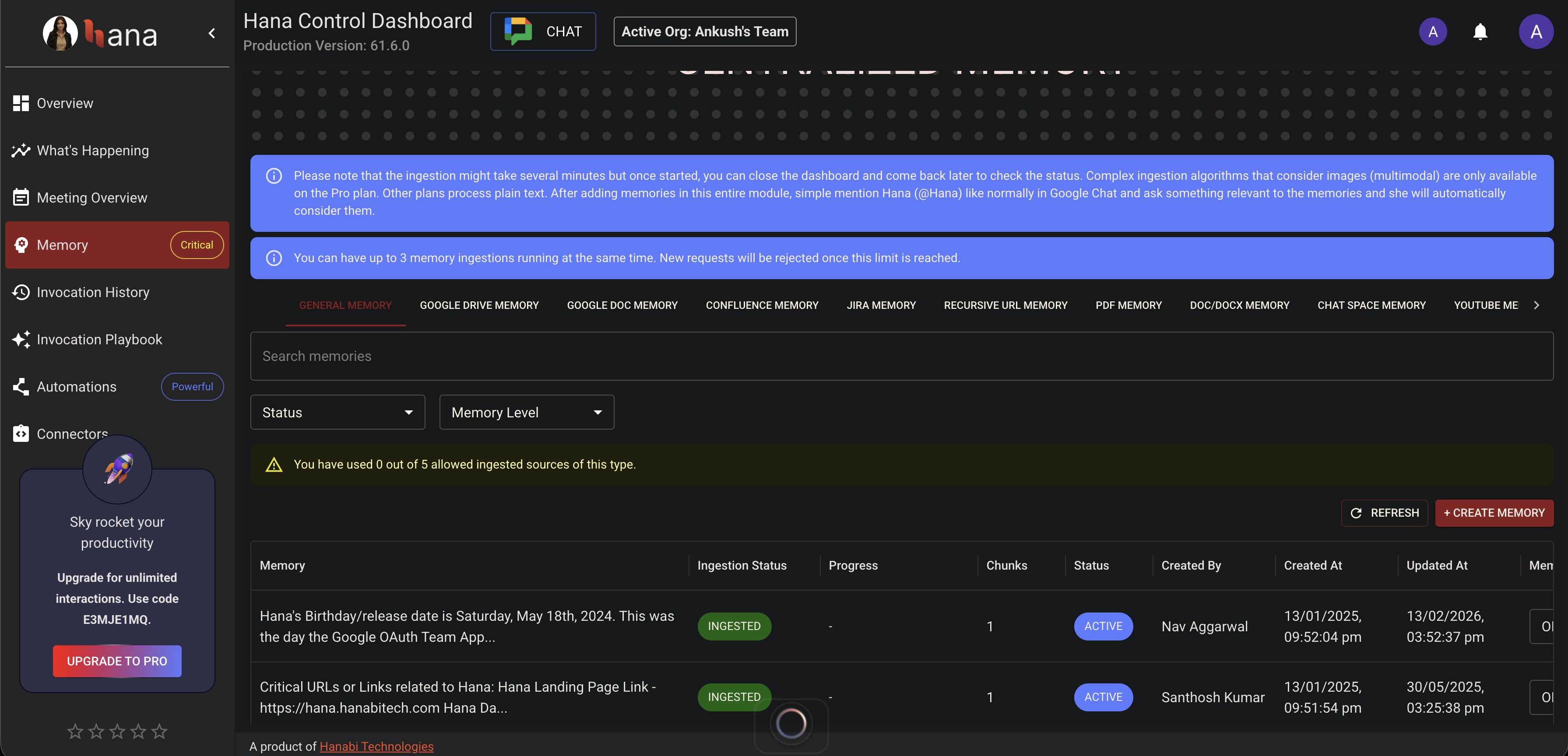
Search team history from the thread
Start from the conversation already in front of you. Hana retrieves decisions, summaries, and context from approved sources without pushing people into another tool.
Search prior chats and knowledge without manual thread archaeology
Bring the answer back into the same working conversation
Useful for decisions, handoffs, onboarding, and operational lookup
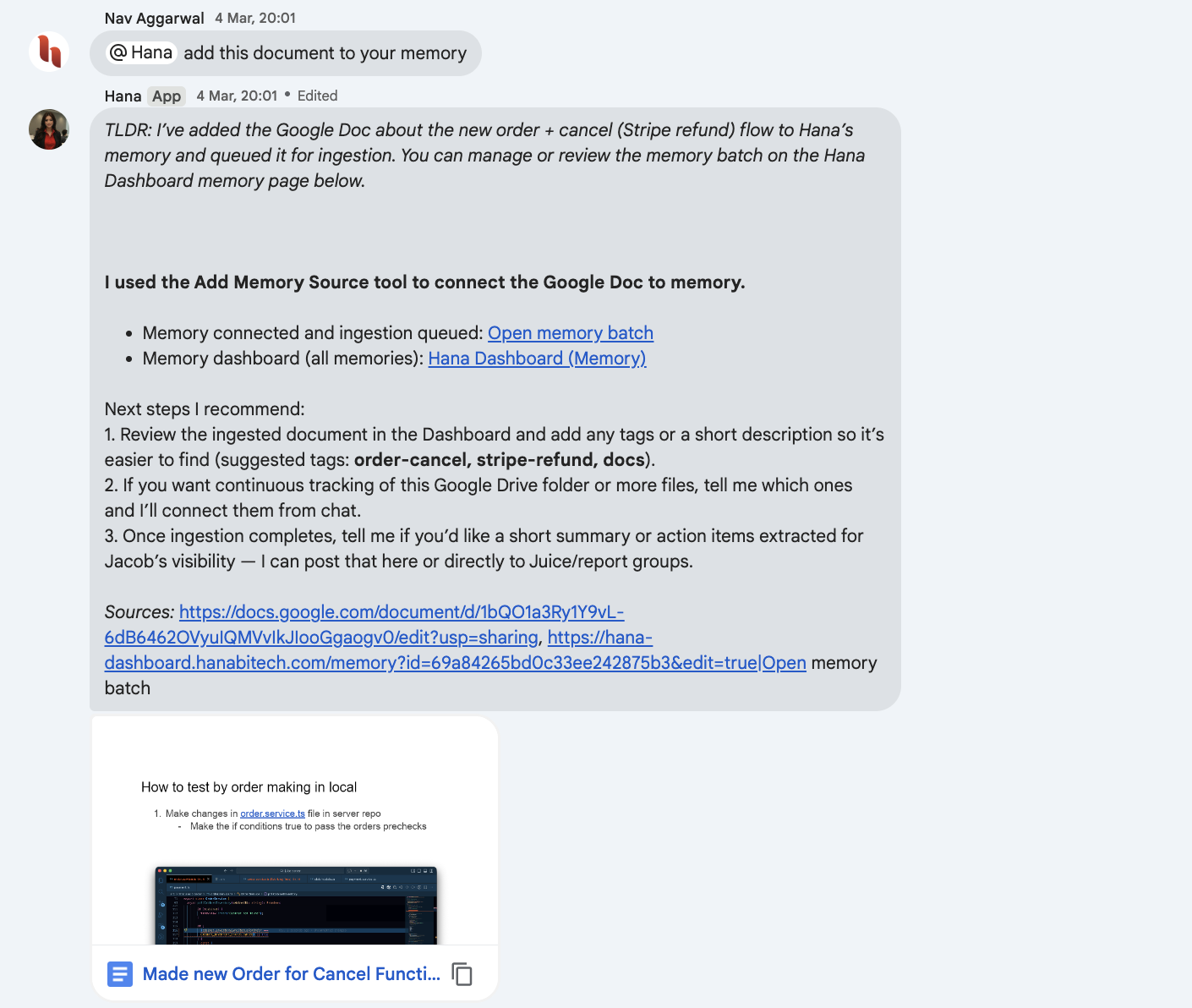
Ground answers in approved workspace evidence
Pull useful context from Drive and connected systems so Hana can answer from the right file, doc, or source without turning your workspace into a black box.
Bring in the background only when the thread needs support
Large files and reference systems stay behind one usable answer
Admin-controlled sync, resync, and rollout
Ready to stop losing decisions inside Google Chat?
Install Hana in Google ChatSee Hana Turning Messages into Actions
Real full-window captures of Hana creating reminders, polls, assignments, and grounded follow-ups in active team workflows
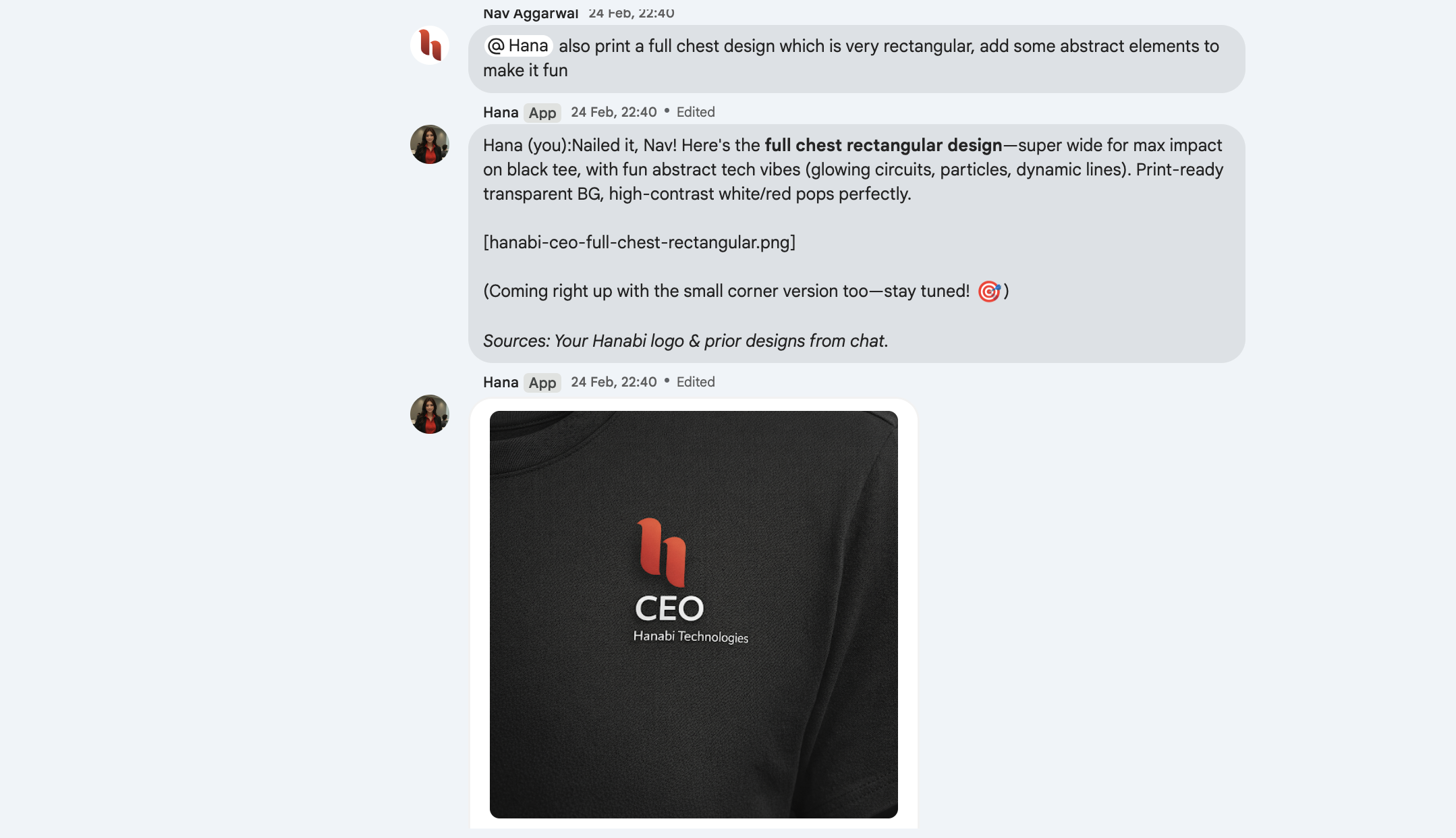
Live Invocation in Space
Real @Hana prompt in a live space with a clear message-to-action flow
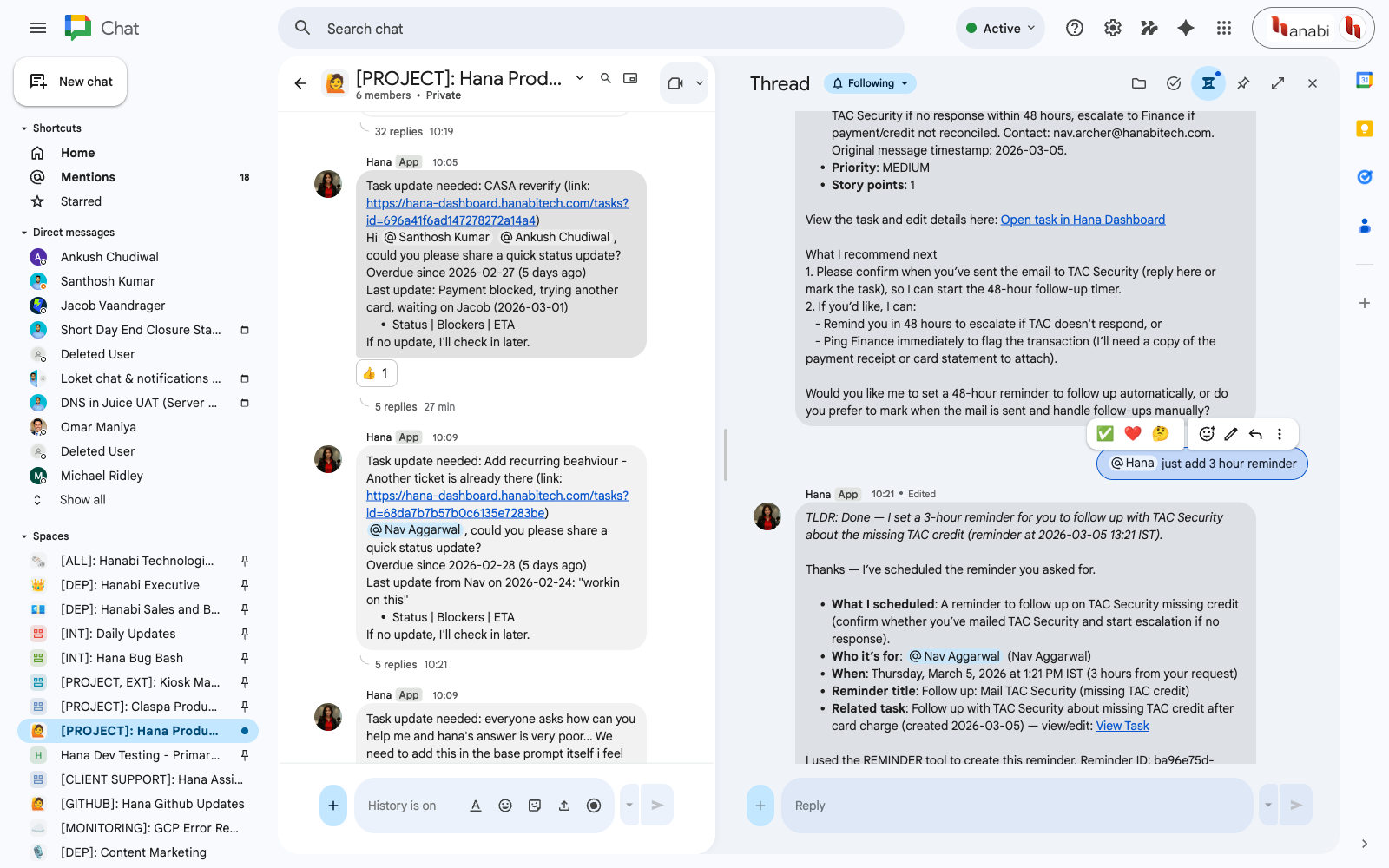
Threaded Task Follow-up
Thread view showing Hana handling status updates, reminders, and ownership
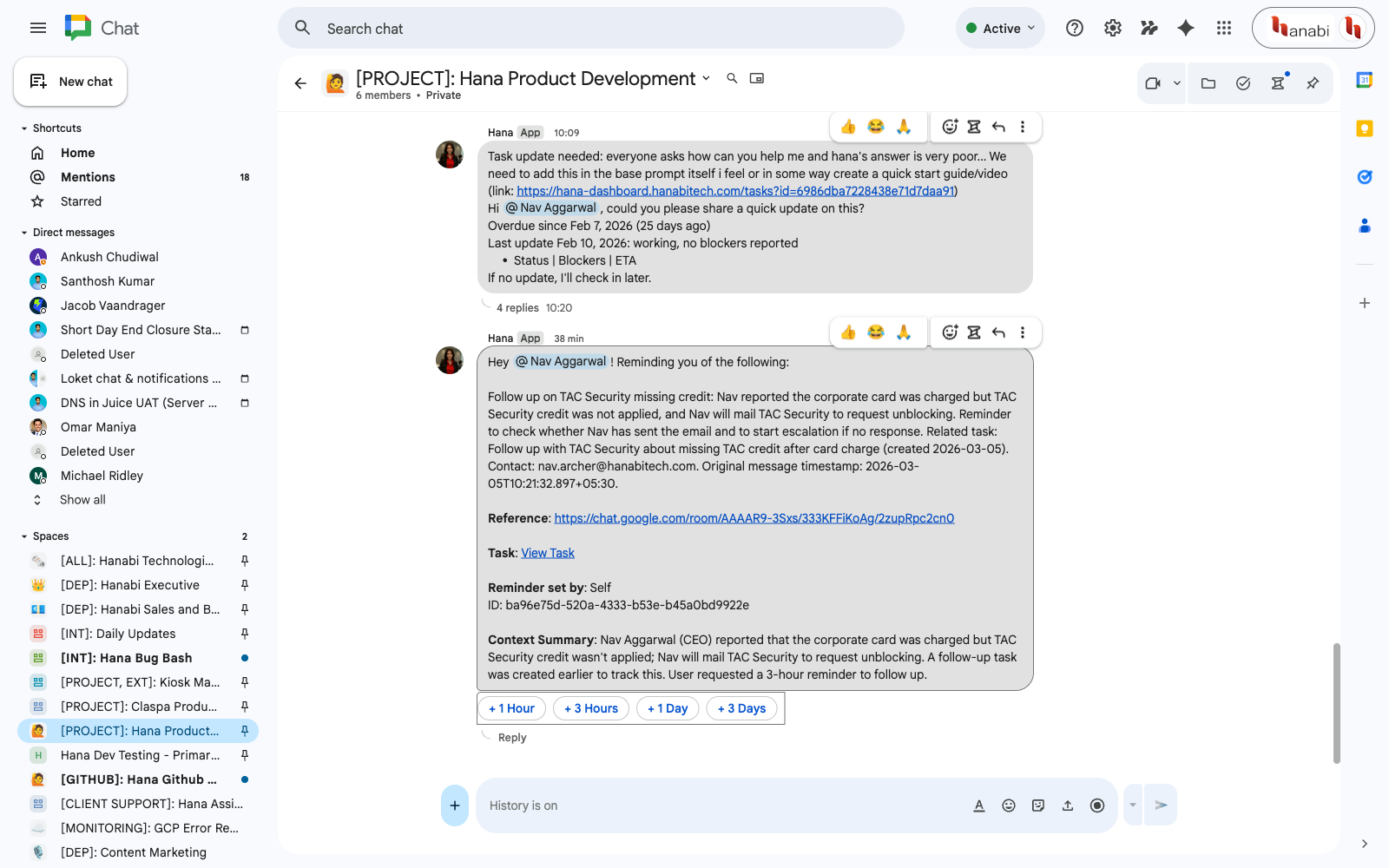
Automated Reminder Output
Hana-generated reminder message with links, summary, and in-thread follow-up details
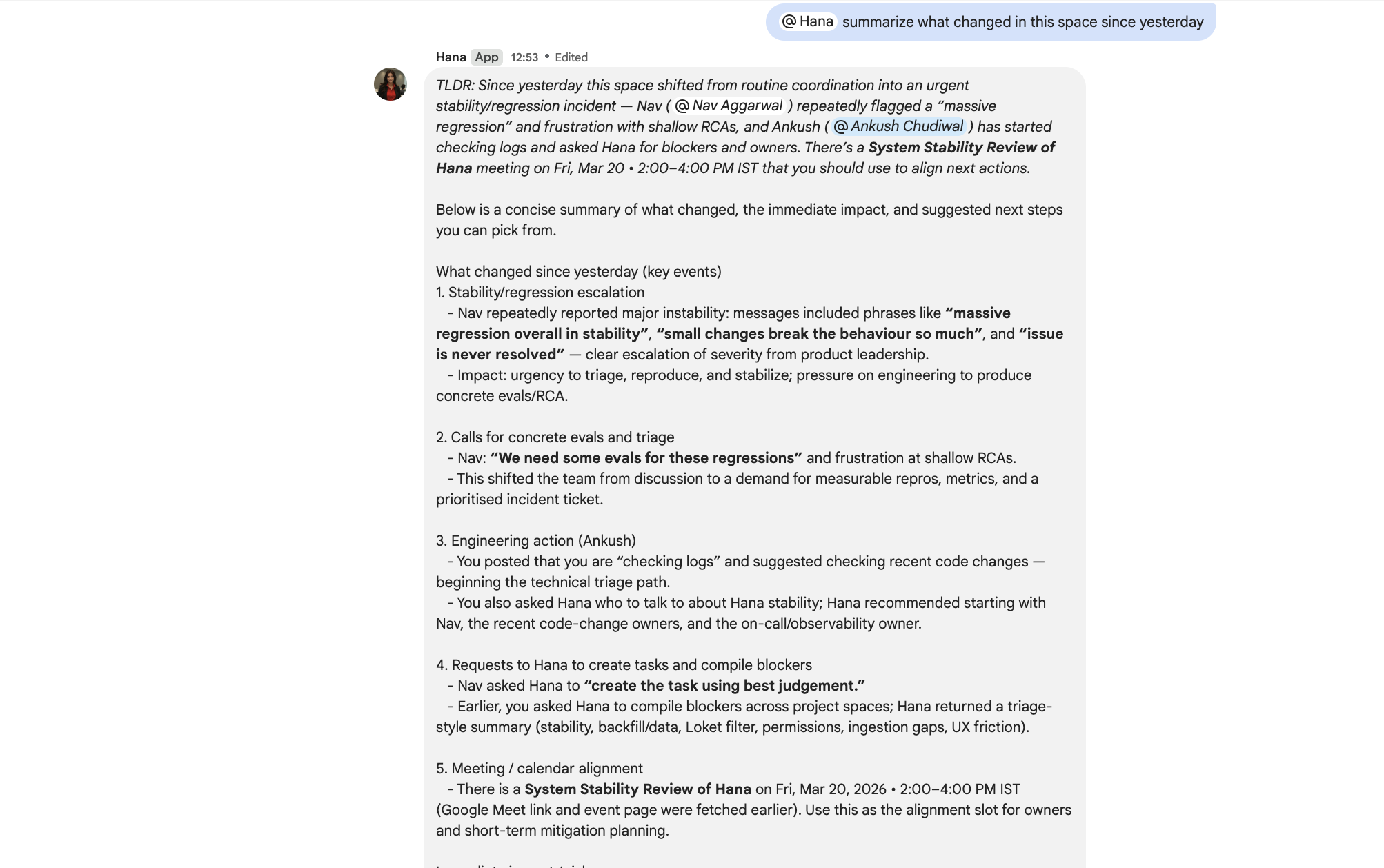
Space Summary Snapshot
A concise Hana-generated recap that pulls key updates, open items, and next steps into one project-space view
Action Library
Copy real Hana prompts for the actions people actually want, then drop them directly into Google Chat.
@Hana can you give us the task associated with this, and if one does not exist, create it with a clear summary and acceptance criteria?Use after a thread has converged on work that should become a tracked task, but nobody wants to manually restate the whole discussion.
Turns a messy implementation thread into a reusable work item without losing the key requirements.
@Hana what is the next step here? Keep it practical and call out the blocker, owner, and immediate action.Best when a team is circling in chat and needs a single operational recommendation instead of another broad summary.
Good for getting a thread unstuck when everyone understands the context but nobody has translated it into action.
@Hana add the update from above to the linked task and mark the current status correctly based on what was completed here.Use when progress happened in chat and you want Hana to move that progress into the task system accurately.
Reduces the gap between discussion and execution tracking.
@Hana add the above progress to the relevant report group as a concise update with outcome, current risk, and next step.Works when several implementation updates have already been discussed and a structured rollup is needed for reporting.
Useful for weekly reporting, founder updates, or project summaries built from live team chat.
Ready to stop rewriting updates and instead make the next step explicit?
Start Your Free TrialAdd the context that makes the first reply feel real
Feed Hana the chats, docs, and websites your team already depends on so the first grounded reply feels specific without turning the product into a background watcher.
Past Chats Become Searchable Decisions
Bring in the conversations your team already had
- Decision history
- Why something changed
- Knowledge transfers
- Process context
Web Docs Become Self-Serve Help
Index websites and linked pages people ask about repeatedly
- Knowledge bases
- Help centers
- Product documentation
- Internal docs hubs
Docs Turn into Fast Answers
Sync the files teams normally dig through by hand
- Google Docs
- Google Sheets
- PDF files
- DOCX files
Multiple Sources Become One Reliable Context Layer
Combine the formats behind real team workflows
- Audio files
- Text memories
- Spreadsheets
- Presentations
How It Works
Add the Sources People Already Ask About
Connect chat history, docs, websites, or files during setup so Hana can ground selected actions in the same context your team already uses.
Hana Organizes the Useful Parts
Hana processes the material into usable context so key decisions, policies, and process knowledge are ready when an action needs support.
Teams Ask Once and Move On
People can act in Google Chat and get a grounded result without manual searching, extra tabs, or a hidden workflow.
Example Use Cases
- "What decision did we make about pricing, and why?"
- "Give me the one-message update I can post instead of standup."
- "What should a new engineer know before shipping their first change?"
- "Find the policy answer without sending me to three docs."
No credit card required • Works with existing Google Workspace
Choose How Hana Shows Up on Day One
Choose the setup that matches the kind of action you want back. Team Actions is for shared follow-through and assignments. Personal Actions is for individual planning and quick support.
Team Actions
Built for teams that want one obvious way to turn a message into a next step.
Action Outcomes
- •Turn a message into a reminder, poll, or assignment without leaving chat
- •Keep the chosen action tied to the original thread
- •Add workspace context only when the action needs it
- •Reduce repeat questions by making the next step explicit
How It Works
- 1Install Hana and connect your workspace
- 2Mention @Hana from the message you want to act on
- 3Say the reminder, poll, or assignment you need
- 4Add context from approved sources only if needed
Workspace-scoped permissions; no local file storage; org admin controls for language, memories, and approvals.
Personal Actions
A lighter Hana for personal follow-through, quick decisions, and staying on top of your own work.
Action Outcomes
- •Use chat as a lightweight place to turn a message into a to-do
- •Draft quick replies and notes without losing your tone
- •Keep everyday work organized without switching tools
- •Stay on top of follow-ups that would otherwise get buried
How It Works
- 1Choose Personal Actions during onboarding
- 2Mention @Hana from a real message or thought in Google Chat
- 3Say the action you want to complete
- 4Get a concise result tuned for personal follow-through
Privacy-first defaults for personal workflows with user-controlled preferences.
Both experiences are configured during onboarding and can be refined as teams learn which actions matter most.
Trusted by teams that need answers they can actually act on
/sc-assets/prd/practices/c02f2a7c-5b90-4a76-a503-ef96e2953fa1/2490058.png)






Why Hana Feels Different From Generic AI
Generic AI is helpful when the task is obvious. Hana is more useful when the thread is messy, the answer depends on team history, and the next step still has to happen.
Generic assistants
Good at producing text
- Summarize this meeting
- Draft this email
- Help with this document or sheet
- Often still leaves your team to recover the context and decide what happens next
Hana's layer
Built for team context, evidence, and follow-through
- Recover what the team decided earlier and use it to move the thread forward
- Create reminders, polls, and similar follow-through from the message in front of you
- Bring in supporting context only when the thread needs it
- Use approved PDFs, URLs, Jira, and Confluence sources when the answer needs proof
Cuts indecision in the thread
Hana turns a message into a concrete next step so the conversation does not stall while people decide what to do.
Keeps the action grounded
When the chosen action needs background, Hana can pull from approved chat history and company sources without changing the core workflow.
Helps teams recover context faster
When approved websites and linked pages are connected, Hana can use them to support answers without forcing people to hunt through those sources manually.
Works with the systems you already use
Hana can use chat history, Drive, Docs, Sheets, Gmail, Meet transcripts, PDFs, URLs, and linked knowledge sources when an action needs real company context.
Turns messages into explicit actions
Use natural language to create reminders, polls, and assignments without leaving the thread or inventing a workflow.
Built for controlled rollout
Admins keep control with OAuth-based access, role settings, and auditable processing, so the action layer can expand safely as more teams depend on Hana.
How Hanabi Technologies uses Hana internally
This is a production-shaped snapshot of how a software company uses Hana for engineering execution, knowledge reuse, debugging support, and internal operations. The setup and metrics are real. Sensitive project details, customer references, and internal-only sources are intentionally generalized.

Hanabi Technologies
hanabitech.com
70
active team chat spaces in day-to-day use
230+
source batches built across docs, chats, URLs, and team notes
10k+
retrievable source chunks supporting engineering and operations questions
8
connected automations and knowledge connectors across Zapier and internal sources
How Hana shows up in the work
Internal use is workflow-first, not demo-first.
A team member asks in Google Chat about a task, bug, configuration issue, or internal operating question.
Hana retrieves from the internal source graph built from chats, docs, URLs, and curated operating notes.
The answer comes back in the same thread, shaped for action: task update, next step, recap, reminder, or grounded explanation.
Important new findings are added back into the source graph so the quality of future answers improves over time.
What they set up
Hana is being used as an internal execution layer for a live software team.
Google Chat is used as the primary operating surface for questions, follow-through, and updates.
A large internal retrieval base was built from text notes, Google Docs, Drive files, recursive URLs, selected chat history, Meet transcripts, PDFs, images, and inbox context.
Connected knowledge sources support technical and delivery context, with Zapier connected for automation workflows.
Knowledge validation is configured in a warning-first mode so the team can move fast while still seeing when an answer needs stronger verification.
Automatic capture is enabled on a meaningful subset of active spaces so context keeps compounding instead of depending on manual curation alone.
What they ingested
The retrieval base is broad enough to support engineering, ops, and founder workflows.
171 text sources for SOPs, operating rules, reusable findings, and internal guidance
24 Google Docs sources for editable working documents and reference material
10 recursive website sources for multi-page reference sources and documentation
10 Google Chat space sources and auto-tracked chat history flows combined
7 Google Drive sources for file-based retrieval across shared workspace assets
Concentrated long-tail sources including PDFs, Meet transcripts, inbox context, image context, and YouTube captions
Where Hana helps most
These are the strongest recurring internal usage patterns seen in production.
Task operations and execution tracking
A major share of usage is turning chat threads into tasks, status updates, and report-group summaries so execution does not drift away from discussion.
Debugging and operational triage
Engineers use Hana to reason over logs, failures, ambiguous thread state, and "what is the next step" questions during active delivery work.
Reusable engineering context
The team regularly stores observations, source-of-truth links, and resolution details so technical context becomes reusable instead of living in one person's head.
Meeting, reminder, and compliance follow-through
Hana is also used for reminder-driven operations, meeting prep, and lightweight compliance or configuration checks that would otherwise create context-switch overhead.
Why this matters for tech firms
Software teams lose time reconstructing context from scattered threads, docs, task updates, and one-off founder notes. Hanabi uses Hana to compress that context retrieval step directly inside chat.
The result is not just faster search. It is cleaner task flow, better debug handoffs, stronger reuse of prior technical decisions, and less dependence on whichever person happens to remember the backstory.
The internal proof point
Hanabi uses Hana across engineering, reporting, reminders, debugging, and internal context capture in production. That makes the product story much more credible for other technology companies evaluating whether Hana can survive real operating complexity.
Trusted by Teams Worldwide
See how teams are using Hana to turn messages into reminders, polls, and assignments inside Google Chat.
"I just had a moment to interact with her and I don't know what happened but she is a whole new Hana. She was already fantastic but because I'm such a visual person I really appreciate the interactive conversational descriptions humanizing her on another level but not just that it seems even just in the tiny time I've been talking to her she's more intuitive and response time is significantly improved"
"We use Hana as a knowledge bank for our organisation. The additional of memories is a bit manual at the moment but the output is very good! Please work on connectors and some automatic memory management and ingestion."
"The has been very efficient in it's working. Made it very easy to manage and streamline multiple projects. High time that such apps enter the online workspaces."
Security for an explicit action layer
Built with security-minded architecture and operational controls for team usage at scale.
Google OAuth
Authentication and scoped access via Google OAuth
Role Controls
Admin and role-based access across dashboard features
Memory Pipeline
Cloud-task ingestion with retries and resync controls
Encrypted Transport
Network traffic secured via HTTPS/TLS
Data Controls
Memory batches can be managed and deleted in dashboard
Team Workflows
Built to make shared team actions usable inside Google Chat
Sponsored by leading technology platforms
Why Organizations Trust Hana
Your security, privacy, and trust are our highest priorities. Here's our commitment to keeping your data safe and secure.
Google Auth
Scoped access
Access Control
Admin governance
Background Jobs
Retry + resync
Org Context
Grounded answers
Security & Privacy
Google OAuth is used for authenticated access and permission scopes
Admins can manage source batches and delete ingested data from dashboard controls
We use Google OAuth for all authentication
TLS/HTTPS transport and controlled server-side ingestion pipelines
Rate limits and role checks are enforced across API flows
Payment & Billing
We use Lemonsqueezy for payments (recently acquired by Stripe)
Users can cancel subscriptions anytime—no lock-in
We never store payment info or participate in the payment process
All payment processing is securely powered by Lemonsqueezy
Operational Reliability
Cloud Task-based background ingestion and retry workflows
Automatic resync and failure handling for supported connected sources
Background maintenance for stuck jobs and ingestion status recovery
Source-batch lifecycle tracking across queued, in-progress, and completed states
Trusted by Organizations
Designed for organization-wide knowledge workflows in Google Chat
Supports admin-managed rollout and connector configuration
Team-focused workflows in Google Chat and dashboard
Scalable infrastructure built on Google Cloud Platform
Enterprise-Grade Security You Can Trust
Hana is built with practical security and operations controls so teams can deploy AI workflows with confidence.
The real problem is not the message. It is the missing context around it
A thread by itself is rarely enough. Teams need the prior decisions, supporting evidence, owner, blocker, and follow-up path behind the message in front of them.
Teams make important calls in chat, then lose the reasoning, owner, and follow-up once the thread moves on.
People still open old threads, docs, and side channels manually just to answer one operational question.
Chat, Drive, docs, transcripts, Jira, and Confluence all matter, but the team rarely has one reliable retrieval layer.
General assistants can draft and summarize, but they usually cannot answer from your team’s real history with enough specificity to be trusted.
Hana turns buried context into usable team context
Search the history, retrieve the evidence, and act in the same place where the work already starts.
Traction & Adoption: Strong Early Growth
With 53,000+ installs from the Google Workspace Marketplace and minimal marketing, Hana demonstrates strong organic demand. From startups to mid-size companies, organizations worldwide trust Hana to unlock their team knowledge.
Join thousands of teams already using Hana to transform their workflow
Start with one message and one clear next step
Discover Hana's Flexible Pricing Plans: Tailored for teams that want enough usage to evaluate Hana in real work
Explore plans built for teams that want to find decisions, answer with evidence, and turn threads into visible follow-through inside Google Chat.
Make the upgrade decisionobvious before your team feels the cap.
Hana's real plan differences are not vague model tiers. They are the limits that decide whether Hana stays a nice demo or becomes an indispensable operating layer: monthly usage, source ingestion, unified digests, and support.
Free bottleneck
30 interactions / user / month
Enough to evaluate Hana in real team workflows before upgrading.
Basic unlock
100 interactions + recurring digests
Turns Hana into a weekly habit instead of an occasional test.
Pro operating mode
500 interactions + unlimited ingestion
Built for teams that want Hana embedded in production work.
Billing interval
Switch between monthly and yearly billing to compare the plan that fits your rollout.
Cost estimator
Estimated total
$90.00
/month total
Entry
Free
Start using Hana in real work before your team commits
Free is for evaluating Hana in Google Chat and grounded retrieval workflows, with enough monthly usage to test it in real team scenarios.
Best for
Small teams testing Hana for the first time
Usage
30 interactions / user / month
Digests
8 What's Happening digests / month
Sources
30 text sources and 10 per other source type
Support
Standard support
What this plan unlocks
- 30 interactions per user each month
- 8 What's Happening digests per month
- 30 text sources and 10 per other source type
Operational workflows
- Use Hana in Google Chat for everyday retrieval and follow-up work
- Run digests while your team is still building a regular usage rhythm
Growth
Basic
Keep Hana active every week, not only in bursts
Basic is for teams that want Hana in regular operational use, with materially more monthly capacity, recurring digests, and broader ingestion workflows.
Best for
Growing teams that depend on Hana every week
Usage
100 interactions / user / month
Digests
20 What's Happening digests / month
Sources
50 text sources and 20 per other source type
Support
Standard support
What this plan unlocks
- 100 interactions per user each month
- 20 What's Happening digests per month
- Recurring weekly or daily digest delivery
Operational workflows
- Enable recurring What's Happening email digests
- Keep Hana useful for teams that rely on it every week
Choose or upgrade your plan after install in the Hana dashboard.
Production
Pro
Run Hana as a production knowledge and execution system
PRO is for teams that rely on Hana daily across heavier usage, broader source coverage, recurring digests, and rollout-sensitive workflows.
Best for
Production teams with larger usage, ingestion, and support demands
Usage
500 interactions / user / month
Digests
Unlimited What's Happening digests / month
Sources
Unlimited source ingestion across supported source types
Support
Priority support
What this plan unlocks
- 500 interactions per user each month
- Unlimited What's Happening digests
- Unlimited source ingestion across supported source types
Operational workflows
- Ingest Google Meet transcripts from Meeting Overview
- Use advanced crawl controls such as sub-page crawl and grouped chunk loading
- Get priority support for production rollouts
Choose or upgrade your plan after install in the Hana dashboard.
Need Hana built around your environment?
If your team needs a custom implementation of Hana, wants to use its own API key, wants Hana connected to its own MongoDB, or needs a rollout designed around internal processes, we can scope that directly with you.
Best fit when
- A standard self-serve plan is close, but not enough
- Security or infrastructure requirements need direct coordination
- You want Hana deployed as a long-term internal system
Compare the real upgrade triggers
Compare the usage limits, digest capacity, source headroom, and support level for each plan.
| Capability | Free $0 | Basic $7/month/user | Pro $15/month/user |
|---|---|---|---|
| Monthly interactions / user | 30 interactions / user / month | 100 interactions / user / month | 500 interactions / user / month |
| Monthly What's Happening digests | 8 What's Happening digests / month | 20 What's Happening digests / month | Unlimited What's Happening digests / month |
| Source ingestion | 30 text sources and 10 per other source type | 50 text sources and 20 per other source type | Unlimited source ingestion across supported source types |
| Support | Standard support | Standard support | Priority support |
Frequently Asked Questions
The practical version of how Hana helps teams recover context, answer with evidence, and act on it inside Google Chat.
Still have questions?
Contact our support team →Our Valued Sponsors
We appreciate the support of our sponsors, who play a vital role in helping us achieve our goals. Their partnership enables us to deliver exceptional experiences and drive positive change.
MongoDB
Empowering Innovation with Advanced Data Solutions
Microsoft Azure
Cloud Computing Excellence for Enterprise Solutions
Google Cloud
Google Cloud, driving innovation with cloud and AI solutions
Contributors 🎉
Meet the talented team behind Hana, working together to revolutionize AI collaboration in Google Workspace
Founder & CEO
Full Stack Developers
Product Designer
HR
Want to join our team? We're hiring!
Hana is Bootstrapped & Ready for Investment
We built Hana from the ground up with our own resources. To keep expanding the Google Chat action layer teams use for tasks, polls, meetings, reminders, and grounded answers, we would love investors to join us.
Contact us to explore investment opportunities.
Ready to supercharge your team?
Add Hana to Google Chat and turn live conversations into concrete next steps.
Turn your next messy thread into a grounded next step
Install Hana to recover team context, answer with evidence, and turn conversation into follow-through without leaving Google Chat.
Free plan available • No credit card required